How it works

How to collect website feedback from clients, without the email chain

Here is the whole thing, from both sides of the link. Your side takes two minutes to set up. Your client's side takes no set-up at all.

Start free trialSee the steps14 days of Studio. No card needed.
app.hopback.io/review/constellation-homepage
Your side

Your side: seven steps, most of them optional

Add what needs reviewing

Paste the website URL, or drag in an image, PDF or video. HopBack loads the live site, including staging sites behind a password, and renders files at full size. This is one HopBack.

1
Optional

Set the rounds and the deadline

Tell HopBack how many revision rounds the project has, say three, and when you need feedback by. Both are optional. Both make the rest easier.

2

Share the link

Copy the review link and send it however you like. Email, Slack, a text. No invitation is needed and your client is not asked to sign up.

3

Feedback lands live

As your client drops carrot pins, each comment appears in your sidebar the moment it is posted, tied to the exact element they clicked. Open and resolved states keep the list honest.

4
Optional

Discuss and resolve

Reply on the pin, set a priority, tag it for whoever is doing the work, and resolve it when it is done. Filter by open, resolved or all.

5
Optional

Start the next round

Upload the revised work or point HopBack at the updated site. Rounds do not have to be the same format: a flat PNG or PDF concept in round one, the staging link in round two, all under the same link. Anything still unresolved carries forward. Compare shows round one and round two side by side.

6

Get sign-off

When your client hits Finish review and approves, their name and the time are recorded, the feedback locks, and you are notified by email, or in Slack and Teams on Studio and Agency plans.

7
Your client's side

Three things, no set-up

1
Open the link

It opens in the browser. The real site, or the design, is right there. They type their name once and HopBack remembers it for the session.

2
Click and comment

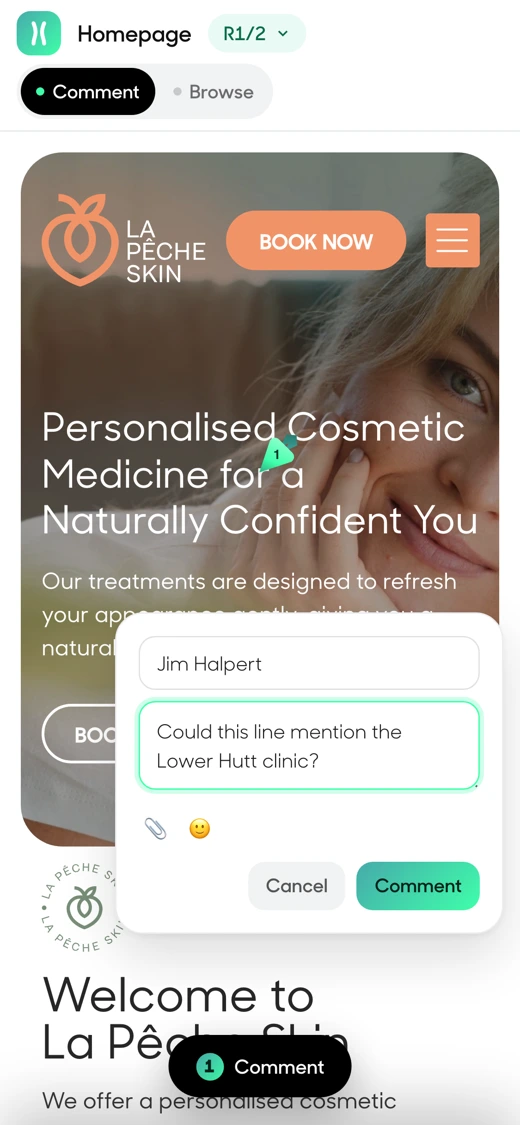
They click the thing they mean, a carrot pin drops, they type. If words are not enough, they attach a reference image or a screenshot to the comment. They can switch between desktop, tablet and mobile widths, move between pages of the site, and reply on threads.

3
Finish review

When they are done they hit Finish review and choose: Approve, or Send feedback. Then they close the tab and get on with their day.
The full reviewer guide, written for clients →

A client reviewing a website on a phone in HopBack
What you get back

What you get back

1Every comment in one place, on the thing it is about, with a reply thread.
2A round-by-round record. Round one's feedback stays as it was; round two starts with what was still open.
3A sign-off with a name and a time, and feedback that cannot be quietly reworded afterwards.
4Fewer "just following up" emails, because HopBack sends the reminders.
5A client who says the review was easy. That is the part that keeps them using it.
Where it fits

It fits the way you already work

Nothing to install on the client's site. No plugin, no snippet, no browser extension for them. Works with any site that has a URL. Notifications go to Slack and Microsoft Teams. Your AI tools can read the workspace through MCP on the Agency plan.

WordPressWebflowSquarespaceShopifyFramerAnything with a URL
FAQ

Questions before the first link

Do I have to add anything to my client's website?

No. HopBack loads the site at the URL you give it. Nothing is installed and nothing changes on the site itself.

Can several people from the client's side review at once?

Yes. Share the same link with as many people as you like. Each reviewer types their name and their comments are labelled with it.

What if the site is behind a password?

Add the staging password when you create the HopBack and it loads normally. Your client never sees the password.

Can I review a design that is not a website?

Yes. Upload an image, a PDF or a video and the same carrot pins work on it. Logos, brochures, packaging, social tiles and video edits all work this way.

How long does set-up take?

About two minutes for your first HopBack. Paste a URL, set the rounds if you want them, copy the link.

See it with your own work

Paste a URL, send the link, and watch the first carrot pin land.

Start free trialSee pricing14 days of Studio. No card needed.