The website feedback tool your clients will actually use

Share a link. Your client clicks anywhere on the live site, a design or a video and drops a carrot pin with their comment. No account, no login, no email chain. You get every comment in one place, revision rounds that carry forward, and a sign-off you can trust.

Start free trialSee how it works14 days of Studio. No card needed.
app.hopback.io/review/dm-homepage
Made by White Rabbit, a design agency in Los Angeles and Auckland, for designers and agencies like ours.
The problem

Feedback should not live in twelve emails and a phone call

You send the staging link. What comes back is a screenshot pasted into a Word document, a voice note, three replies to the wrong thread, a page of AI slop, and a request to "make it pop".

Then the client goes quiet for a week. When they finally reply, it is nine paragraphs an AI wrote for them, about a page it has never seen. When they finally approve, the brief changes again, and nobody can find where they said yes.

None of that is the client's fault. Nobody enjoys giving feedback in email. HopBack gives them somewhere better to put it.

1"Make it pop."
2"Which version is this?"
3"I thought we'd approved that."

"We run a design agency. For years our client feedback arrived by email: screenshots pasted into Word documents, voice notes, 'make it pop'. So we tried the feedback tools on the market. None of them did what we needed, real revision rounds and a sign-off we could point to, and our clients rarely opened them, so the feedback drifted straight back into email. The one we stuck with then more than doubled its price overnight. So we built HopBack. Every feature in here exists because a real client asked for it, or because we needed it on a Friday afternoon."

Simon Ellery, White Rabbit
How it works

Share a link, your client pins their feedback, you get sign-off

1Add

Add what needs reviewing

Paste a website URL, or upload an image, PDF or video. HopBack loads the live site, staging password and all, ready to comment on.

2Pin

Your client drops carrot pins

They open the link, click the exact thing they mean, and type. No sign-up. Every comment lands in your sidebar, tied to its pin, the moment it is posted.

3Sign off

Approve, or send feedback

When they are done they hit Finish review and choose. Approve, with their name and the time recorded, or send feedback for the next round. Confetti on approval.

See the full flow, both sides →

Features

Everything between "here's the link" and "approved"

HopBack is website feedback software first. It reviews whatever else you make, too.

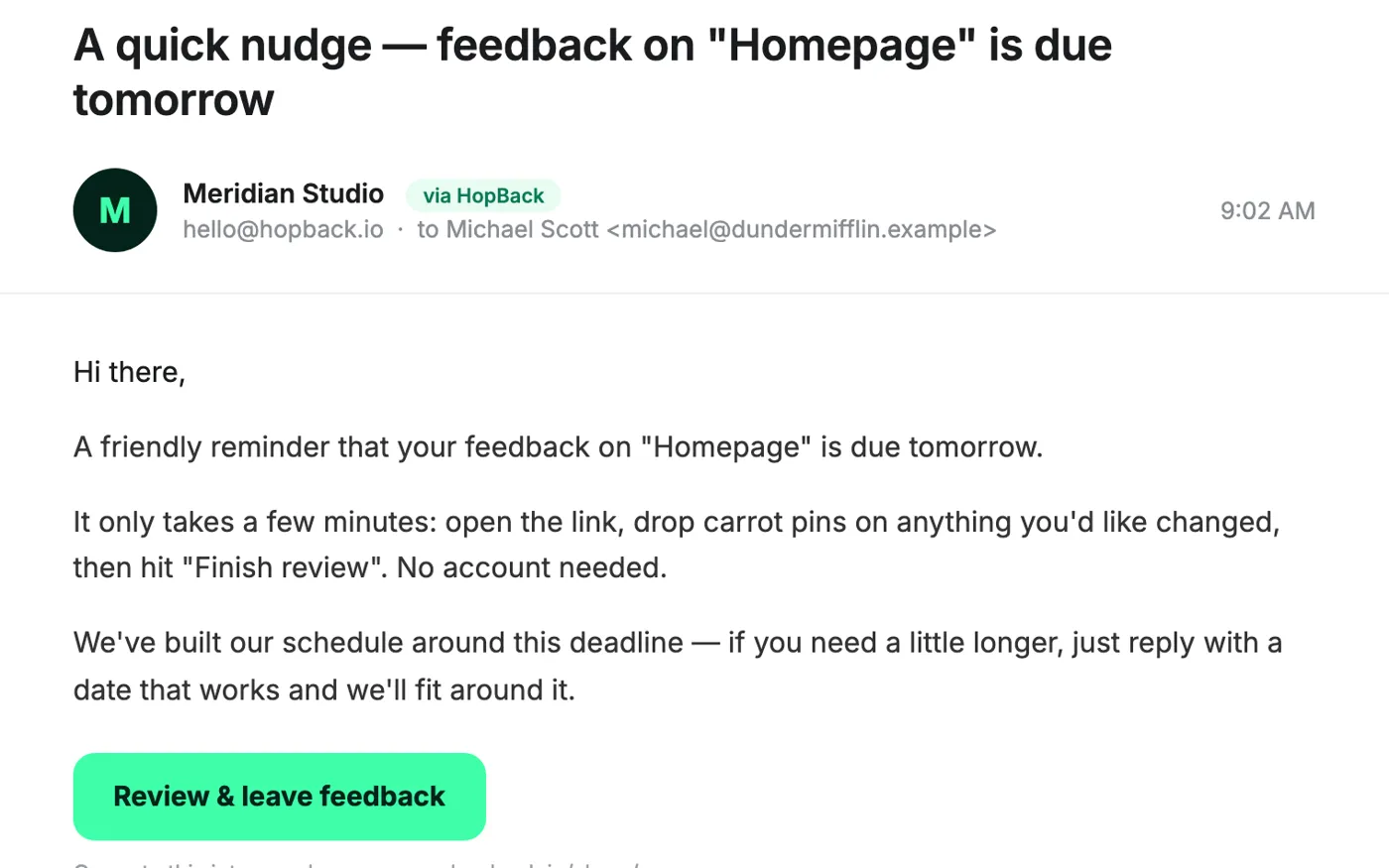
The HopBack reminder email as a client receives it

Hover or tap a feature to see it.

For your clients

No account.
No login.
No excuses.

The best feedback tool is the one your client will open. HopBack asks nothing of them: a link, a click, a comment. Their name is remembered for the session, and that is the whole set-up.

See what your client sees →

Coming from Markup.io, BugHerd or Pastel?

You will notice three things. Unlimited clients on every plan, so nobody is counted as a seat. No monthly review meter to watch. And a price that stayed reasonable.

Compare HopBack with the tools you know →
Pricing

Simple pricing. Unlimited clients on every plan.

Starter
$19 a month
For one person and a handful of clients.
  • 2 team seats
  • 10 active reviews
  • Unlimited client reviewers
  • Websites, images and PDFs
  • Up to 3 rounds per project
  • Approvals with a locked record
Start free trial
2Dwight Schrutejust now

This one. Obviously.

StudioMost popular
$49 a month
For small teams who run rounds.
  • Everything in Starter
  • 5 team seats, 30 active reviews
  • Unlimited rounds and Compare
  • Automated client reminders
  • Slack and Microsoft Teams
  • Video review
Start free trial
Agency
$99 a month
For teams with a full warren of clients.
  • Everything in Studio
  • 12 team seats
  • Unlimited active reviews
  • MCP access for AI tools
  • Custom reminder copy per client
  • Priority support
Start free trial

Annual plans get two months free. Prices in USD. Every plan starts with 14 days of Studio, no card needed. See full pricing →

Proof

What agencies
are saying.

Three studios on what changed once one link replaced the email thread.

We swapped a fourteen-email thread for one link. Our client did the whole review on her phone in the back of a taxi, and every comment landed on the exact element she meant.

TMTessa MoranCreative Director, a six-person web studio, Sydney

Rounds changed how we quote. Three rounds in the contract, three rounds in HopBack, and the client can see exactly which one we are on. Scope creep became a conversation instead of an argument.

LHLuis HerreraFounder, a design and development agency, Portland

Our print clients pin the barcode, the bleed, the Pantone reference, straight on the artwork. It replaced the marked-up PDF and the phone call that used to follow it.

HRHannah ReidStudio Manager, a brand and packaging studio, Auckland
FAQ

Questions agencies ask before they try it

Do my clients need an account?

No. You share a link, they open it and comment. They type their name once and HopBack remembers it for the session. There is nothing to install and no password to reset. Most clients find it easier than email, because pointing at the thing is easier than describing it. And there is a little confetti when they approve, which never hurts.

What can I review in HopBack?

Live websites, including staging sites behind a password, plus images, PDFs and video. That covers websites, logos, brochures, packaging, social tiles and video edits. Each item is one HopBack.

Does it work on staging sites?

Yes. HopBack loads the real site at the URL you give it, including staging sites protected by a password, so your client reviews the actual thing they are signing off.

What happens when a client finishes a review?

They hit Finish review and choose one of two things. Approve, which records their name and the time. Or Send feedback, which sends their comments to you for the next round. Either way, the feedback locks so it cannot be quietly reworded later. You are notified by email on every plan, and in Slack or Microsoft Teams on Studio and Agency plans.

How do revision rounds work?

When you create a HopBack you set how many rounds the project has, for example Round 1 of 3, so you and the client both know where you are. When round one is done, you start round two with the updated work. Any comment that is still unresolved carries forward into the new round. Comments you have resolved stay in round one. The client reviews each round from the same link and can look back at earlier rounds whenever they like. If the scope grows, you can add a round at any time. Rounds can also be different formats: a PNG or PDF concept in round one, the staging site in round two, all under the same link. Compare shows two rounds side by side so everyone can see exactly what changed.

How is HopBack different from Markup.io or BugHerd?

Unlimited client reviewers on every plan, no monthly review meter, numbered revision rounds with carry-forward, a finish-review lock, and approvals with a name and time recorded. HopBack is not a bug tracker and does not try to be one. The comparison pages have the detail, with prices checked and dated.

Is there a free trial?

Yes. Every account starts with 14 days of the Studio plan and no card is needed. After that, plans start at $19 a month.
Your next round of feedback could be the easy one

Set up your first HopBack in two minutes. Send the link. See what comes back.

Start free trialTalk to us14 days of Studio. No card needed.3Pam Beeslyjust now

Approved. Sending confetti.